


MySubaru
4.77.24K Reviews
App Specs
- Version
- 3.5.1
- Updated On
- License
- Free
- Downloads
- 1,000,000+
- Developer
- Mobile - Subaru Of America
- Categories
- Auto & Vehicles
- Platform
- Android, iOS
Screenshots
 Analysis by AppCompare
I treat MySubaru as a companion for owning a Subaru, rather than as an app I would open just to browse. Its appeal is practical: a phone can handle a few car-related checks and errands without making me walk back to the vehicle or search through separate tools. That is most useful when those tasks fit naturally into a routine, such as checking whether the doors are locked before bed or arranging service before a busy week.
What to expect from everyday speed
A connected-car app has a different kind of speed from a map or a messaging app. The important question is whether a requested action or vehicle detail is ready when I need it, and that can depend on the connection between the phone and the car as well as the vehicle itself. I would think of the app as a convenient way to request information, not as a guarantee that every remote action will feel instant in every situation.
That distinction matters most when I am in a hurry. If I need to confirm a lock or prepare the car before heading out, I would open the relevant control with enough time to see what happens instead of tapping repeatedly and assuming the first request worked. For a quick glance at a trip plan or a service task, that extra moment is less important. The best experience comes from using it as a helpful channel, not treating it as a substitute for paying attention to the car.
When several features come into play
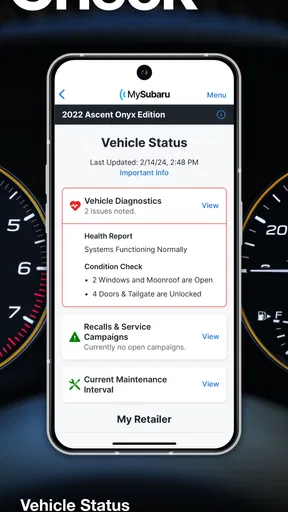
The app is easier to appreciate when a few ownership tasks are considered together. I might check a vehicle health report, look at an upcoming service need, and then make a plan for getting the appointment handled. That is a more meaningful workflow than opening the app only to test one remote control. It also helps me decide what needs attention now and what can wait until I have time to deal with it properly.
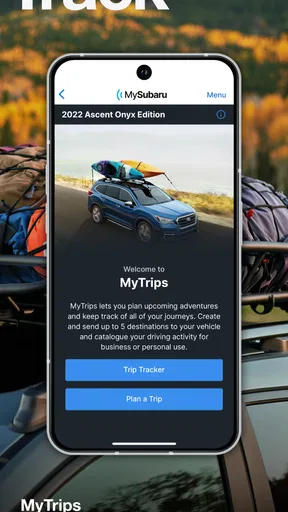
Travel planning is another situation where expectations matter. A destination sent to the car, a parking reminder, and a broader trip plan each serve a different purpose. I would use the trip tools to organize an outing, then rely on whichever navigation method works best once I am actually driving. Keeping planning and live navigation separate is sensible: the app can help prepare the journey without needing to replace every tool already on my phone or in the vehicle.
Getting to Know MySubaru
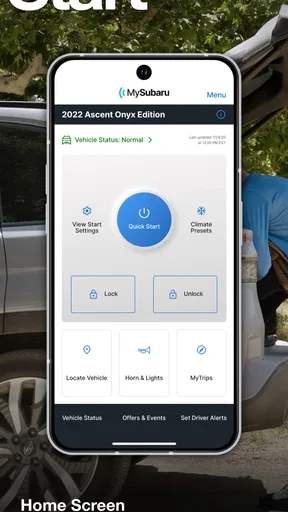
The MySubaru app is your vehicle's best friend, and honestly, it feels like a pretty solid companion for you too. Available on both Android and iOS, this app connects you to your Subaru in ways that make those James Bond car gadgets seem almost real. You can start your car, check its health, and even plan your trips—all from your smartphone.
Features That Make Life Easier
First off, the app’s remote start feature is a game-changer. Imagine those chilly mornings where you can get your car warmed up while you're still sipping your coffee. Sweet, right? And if you’re like me, always wondering if you locked the car, the app has you covered with remote lock and unlock features.
Worth Reading Before You Choose

EA SPORTS FC Mobile 26 Is a Bigger Football Game, but It Takes Time

Flipboard Shows What News Apps Must Do Beyond the Feed

Switching to Android Auto Means Rethinking Your Driving Routine

Google Calendar Makes a Crowded Week Easier to Manage

Ludo King Makes the Most of the Minutes Between Plans

Baby Panda World Brings Quick Play to Modern Phones, but Its Game Library Feels Busy
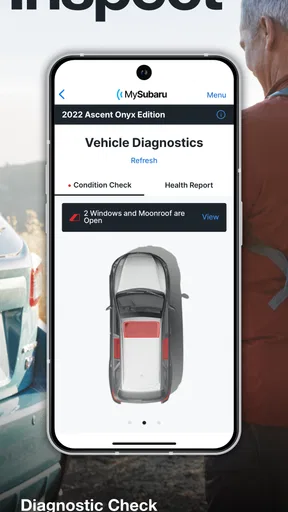
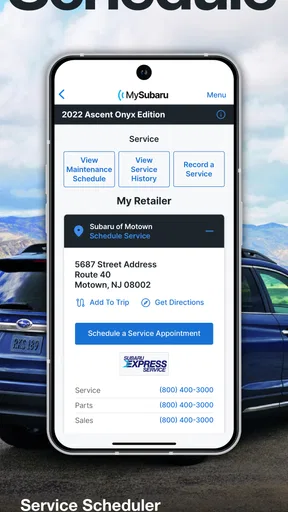
Another cool feature is the vehicle health report. The app keeps an eye on your Subaru’s health and alerts you if there’s anything you need to worry about. It's like having a mechanic in your pocket. Plus, you can schedule your service appointments directly through the app, saving you time and hassle.
Navigation and More
For those road trip lovers, the app offers a built-in navigation feature. You can send destinations directly to your car, making it super easy to plan your next adventure. There's also a parking reminder, which is a lifesaver in crowded parking lots. No more aimless wandering trying to remember where you parked!
And let’s not forget the convenience of the trip planner. You can map out your journey, check fuel prices, and even find points of interest along the way. It’s like having a co-pilot who knows all the shortcuts and best stops.
Living with connected-car tools
A useful habit is to decide what the app should do before opening it. If I am checking a door lock, I go straight to that task and look for its result rather than treating a tap as proof. If I am planning a long drive, I can gather destinations and stops ahead of time, then choose the navigation setup that suits the actual route. This small separation keeps a useful convenience from becoming a source of distraction.
For service planning, I would use the health information as a prompt to follow up, not as a replacement for a technician’s inspection. A report can make it easier to notice that something deserves attention and to arrange an appointment, while a mechanic remains the right person to diagnose a concern. Likewise, a service appointment option is valuable when it saves a call or makes scheduling easier, but it does not remove the need to check that the selected time and service match what the car needs.
Who benefits most—and who may not
This app makes the clearest case for itself if you own a compatible Subaru and expect to use its connected controls, service tools, or travel features more than occasionally. It is particularly handy for a household where more than one person drives the same vehicle: a quick status check or a shared routine can reduce the little uncertainties that come with handing over the keys. For a driver who rarely needs remote functions and already has a preferred service and navigation routine, the extra app may be less compelling.
Compared with general navigation apps, MySubaru is more focused on the relationship between an owner and a particular vehicle. A standard map app may be the better choice for live route guidance or for someone who changes cars often; this app’s appeal is the mix of car-oriented tasks, service planning, and trip preparation. It is not a universal replacement for maps, a repair professional, or every tool a driver uses. I see it as a useful layer around Subaru ownership, with the strongest value coming from features that connect directly to the car.
Compatibility, setup, and sensible expectations
Before relying on any connected-car feature, I would make sure the vehicle and account are set up for the functions I want. Not every Subaru or every configuration necessarily offers the same experience, so it is sensible to confirm compatibility for a specific car rather than assume that installing the app alone enables every control. That is especially important if remote start is the main reason for downloading it.
The app is free and developed by Mobile - Subaru Of America. It has a 4.7 average from around 86,000 ratings, with over a million installs, which suggests it has found a substantial audience among owners. Its Everyone age rating makes it broadly accessible, but the practical value still depends on being a Subaru owner and having a vehicle that supports the relevant connected functions. The current version is 3.2.3, and it requires Android 10 or later; iOS users should check the requirements shown for their device before installing.
Stability and device demands
I would judge reliability by whether the app consistently helps with the task at hand, rather than expecting it to behave like a basic offline utility. Vehicle status and remote commands rely on a connection beyond the phone, so a delay or an uncertain response is a reason to check again through a sensible alternative, not to assume the car has changed state. When a task is safety- or time-sensitive, I would verify it directly instead of depending on an app response alone.
On the device side, the Android requirement is a practical boundary: an older phone that cannot run Android 10 will not be a fit. For supported phones, the app’s purpose is focused enough that I would not choose it based on demanding graphics or elaborate media use. Still, I would keep the operating system current and leave enough time for the app to communicate with the vehicle, especially before a departure. If a screen seems slow, checking the connection and reopening the relevant task is more useful than repeatedly sending commands.
Is It Worth It?
Overall, the MySubaru app is packed with features that make owning a Subaru even more enjoyable. It’s intuitive, user-friendly, and genuinely enhances the driving experience. The remote features alone are worth downloading the app, but when you add in the maintenance notifications and trip planning capabilities, it really becomes indispensable.
If you're a Subaru owner, I’d say give it a whirl. It’s like having a personal assistant for your car, and who wouldn’t want that? So go ahead, download the app and see how it transforms your daily drive into something a little bit more extraordinary.
Pros
- User-friendly interface for easy navigation.
- Remote start and lock functionality included.
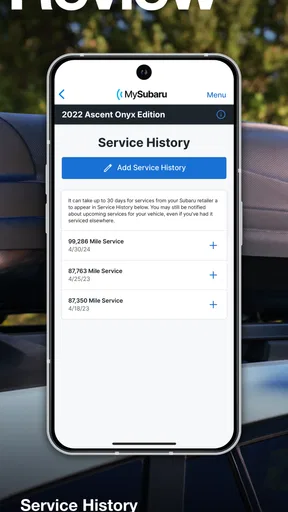
- Access to maintenance schedule and history.
- Locate your vehicle with GPS tracking.
- Receive vehicle health alerts and updates.
Cons
- Limited to Subaru vehicle owners only.
- Some features require active internet.
- Occasional syncing issues reported.
- Battery usage can be high with GPS.
- Certain features locked behind paywall.
FAQs for MySubaru
What features does the MySubaru app offer?
The MySubaru app provides a comprehensive suite of features to enhance your Subaru ownership experience. It includes remote start, lock/unlock capabilities, vehicle status checks, maintenance reminders, and service scheduling. Additionally, it offers roadside assistance and vehicle locator services to ensure you're always connected to your Subaru.
Is the MySubaru app compatible with all Subaru models?
The MySubaru app is compatible with most newer Subaru models, but availability of specific features may vary depending on the vehicle's year and trim. It's advisable to check with your dealer or consult the app's compatibility list before downloading to ensure it meets your vehicle's specifications.
How secure is the MySubaru app?
The MySubaru app incorporates robust security measures to protect your data. It uses encryption protocols to safeguard information transmitted between your device and the vehicle. Additionally, it requires authentication through a username and password, ensuring that only authorized users can access the app's functionalities.
Does using the MySubaru app require a subscription?
While the MySubaru app is free to download, some features may require a subscription to Subaru's STARLINK Safety and Security services. These premium services provide enhanced functionalities such as remote vehicle management and advanced safety features. Check the app for details on subscription packages and pricing.
Can I use the MySubaru app on multiple devices?
Yes, the MySubaru app can be installed on multiple devices, allowing different family members to access and manage the vehicle. However, each device must log in with the same account credentials to synchronize features and settings across all devices, ensuring a seamless experience for all users.


